Long Hours of Sitting and Your Back: Quick Moves You Can Do at Your Desk

The short answerSitting for long stretches puts a load on your lower back, neck and shoulders, mostly because your body stays in the same position for hours. The simplest way to feel better is to break up the streak: get up or move every 30–45 minutes, do 2–3 quick moves at your desk, and adjust your chair and screen so your back is supported and your head isn't pushed forward.
In a nutshell
- The problem with long hours of sitting is mainly the lack of movement, not the sitting itself.
- Get up or change position every 30–45 minutes, even for just a minute.
- 2–3 quick moves at your desk loosen up your back, shoulders and neck without breaking a sweat.
- A chair, screen and keyboard at the right height make you less likely to sink and slouch.
Why do you feel long hours of sitting in your back?
You feel it in your back because the muscles that hold it up work for hours without changing position, and they get tired. Most people also gradually slide forward in their chair, round their lower back and push their head toward the screen.
The result is familiar: a stiff lower back when you stand up, tension between your shoulder blades and a neck that feels tight by the end of the day. Sitting itself isn't the enemy; it's the lack of movement over time that adds up.
The good news is that you don't need a full workout to feel a difference. Short moves spread through the day give your body a chance to move, change position and loosen muscles that have been locked up for hours.
Which quick moves can you do at your desk?
You can do all of these in work clothes, with no equipment and no sweat. Each takes 30–60 seconds, and picking 2–3 per break is plenty.
- Seated pelvic tilt: sit at the edge of your chair with your feet on the floor. Slowly roll your pelvis forward so your lower back arches slightly, then back so it rounds. Repeat 8–10 times at a slow pace.
- Chest opener: clasp your hands behind your head, open your elbows out to the sides and breathe deeply while gently lifting your breastbone. Hold for three breaths and release.
- Gentle seated twist: sit tall, place your right hand on your left knee and your left hand on the back of the chair, and slowly rotate your torso to the left. Hold for a few breaths, then switch sides.
- Shoulder blade squeeze: draw your shoulder blades together and down, as if tucking them into your back pockets. Hold for five seconds and release, ten reps.
- Chin tuck: without dropping your head, draw your chin slightly back. This brings your head back over your shoulders after a long time at the screen.
- Standing back bend: stand up, place your palms on your lower back and lean your upper body slightly backward, only within a comfortable range. Five slow reps.
Rule of thumb: the moves should feel pleasant or neutral. If a move triggers sharp pain or pain that spreads, skip it.
How often should you get up from your chair?
The common recommendation is to get up, or at least change position, every 30–45 minutes. Even two minutes walking to the kitchen or taking a phone call standing up counts.
A few simple ways to work movement into your day:
- Take phone calls standing or walking.
- Keep a small water bottle on your desk; when it's empty, get up to refill it.
- Set a quiet reminder on your phone or computer.
- Build a regular habit: after every meeting, one minute of movement.
If you find it hard to notice your posture when you're focused, the PosturePro posture trainer can help: a small sensor that attaches to your upper back and vibrates gently when you slouch. It's a quiet reminder to sit up straight, with no beeping and no need to stop working.
How to set up a back-friendly workspace
A well-set-up workspace doesn't replace movement, but it makes you less likely to sink and slouch. The table sums up the main checks.
| Item | What to check | Sign it needs fixing |
|---|---|---|
| Chair | Feet flat on the floor, knees roughly level with your hips | Feet dangling or knees higher than your hips |
| Backrest | Your lower back rests against it, with support for its natural curve | A gap between your lower back and the backrest |
| Screen | Top edge roughly at eye level, about an arm's length away | Your head juts forward or tilts down |
| Keyboard and mouse | Close to your body, elbows at about 90 degrees | Raised shoulders or arms stretched forward |
| Laptop | A stand, plus an external keyboard and mouse | Working for long stretches while looking down |
If your chair's backrest doesn't offer support, a rolled-up towel or small cushion at waist height can give a feeling of support for the curve of your lower back.
What to do at the end of a long day of sitting
In the evening, give your back a chance to unwind: a short walk, a warm shower, or a few minutes lying on your back with your knees bent.
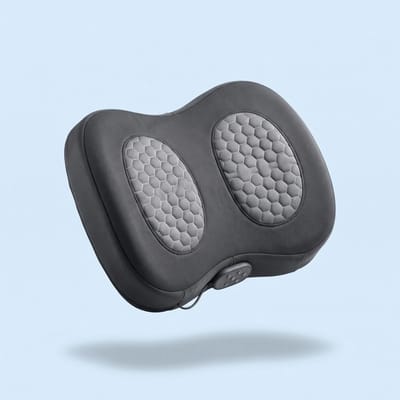
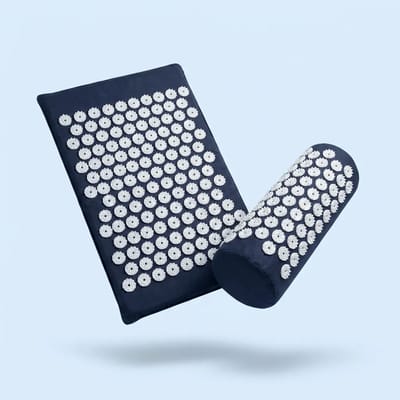
Some people add a moment of relaxation with massage. A heated back massage cushion like BackWave sits on your chair or bed and combines rotating shiatsu massage, heat and vibration; 15–20 minutes is enough. Another option is lying quietly for about 20 minutes on an acupressure mat. You'll find more ideas in our Back collection.
Not sure what's right for you? Email us at hello@getxneex.com and real people from the XNEEX team will get back to you.

Frequently asked questions
How often should I get up when I work sitting down?
There's no magic number, but the common recommendation is to get up, or at least change position, every 30–45 minutes. Even a one- or two-minute break, like walking to the kitchen or taking a call standing up, is enough to break the streak and let your back and muscles move.
Is working standing up better than sitting?
Standing for hours on end is tiring too, especially for your feet and lower back. What usually works is a mix: switch between sitting and standing during the day and add quick moves. Your body likes variety more than any single position, however comfortable.
What's the quickest lower-back move at my desk?
The seated pelvic tilt is one of the simplest: sit at the edge of your chair and slowly roll your pelvis forward and back 8–10 times. It takes less than a minute, you don't need to get up, and it works even in the middle of a video call.
Is a posture trainer suitable for use throughout the workday?
PosturePro is a small sensor that attaches to your upper back and vibrates gently when you slouch, as a reminder to sit up straight. Many people use it during work hours to build a habit. It doesn't replace breaks and movement; it helps you remember them.
When does back pain from long hours of sitting need checking?
If the pain is sharp, spreads down your leg, comes with numbness or weakness, gets worse over time or started after an injury, see a doctor or physical therapist. Mild stiffness that eases after a little movement is usually related to habits and posture.
More from the Knowledge Center
Tight back and tired muscles: a guide to what helps at home and at work →Heated back massage cushion: how to use it right at home and in the car →Acupressure mat: how to use it right and who it isn't for →All articles →This article is general information and is not a substitute for medical advice.