Posture Trainer: How It Works and How to Build an Upright Sitting Habit

The short answerA posture trainer is a small sensor that attaches to your upper back, notices when you slouch and vibrates gently to remind you to sit up. Unlike a posture brace that holds your body passively, here your own muscles do the work. Combined with a well-set-up workspace and movement breaks, the reminders gradually help you build an upright sitting habit.
In a nutshell
- A posture trainer vibrates gently when you slouch, a reminder only you can feel.
- A brace holds your body; a posture trainer reminds your muscles to do the work.
- Start with about 30 minutes a day and build up gradually, on the most forgiving sensitivity at first.
- A screen at eye level, the right chair and movement breaks complete the habit.
What is a posture trainer and how does it work?
It's a small sensor that sits on your upper back and detects when you sink forward. When that happens, it vibrates gently, a quiet reminder that only you feel.
The process is simple: attach the sensor to your upper back, sit up straight and calibrate with one press. From then on, any drift from the posture you calibrated triggers a vibration. You straighten up, the vibration stops, and you carry on working.
The goal isn't to force you into position, but to bring your attention back to your body at moments when it's easy to forget, like halfway through a long email or a Zoom meeting.
How is a posture trainer different from a posture brace?
The key difference: a posture brace holds your body in place, while a posture trainer reminds you to hold it yourself. When your own muscles do the work, a habit forms.
| Posture brace | Vibration sensor | |
|---|---|---|
| How it works | Straps that pull your shoulders back | A gentle vibration when you slouch |
| Who does the work | The brace, passively | Your muscles |
| What's left when you take it off | Depends on what happens when the brace isn't there | Awareness and a habit built up gradually |
| Visibility | Usually noticeable over or under clothing | Small and discreet, under your shirt |
Some people prefer the feeling of something holding them, and some want to learn to sit differently. If you're in the second group, a gentle reminder is the better fit.
How do you build an upright sitting habit?
Gradually. Start with short sessions on a forgiving sensitivity, and raise the bar as your body adjusts. Trying to sit "perfectly" for eight hours from day one usually ends in fatigue and giving up.
- First week: about 30 minutes a day, on the most forgiving sensitivity. Notice the moments when the vibration kicks in.
- Following weeks: gradually extend the time, based on how you feel.
- When it feels easy: raise the sensitivity level to fine-tune.
- All along the way: get up and move. Sitting upright is no substitute for movement.
Tip: if the vibration keeps going off in the same situation, for example when you look at your phone, that's a sign to change your setup, not just to "try harder."
Who is it for, and what are the common mistakes?
A vibration reminder is especially handy for people who spend hours at a computer, drivers, students, and anyone who notices at the end of the day that their shoulders have "dropped" forward without realizing it.
- Calibrating in an exaggerated posture: calibrate while sitting upright and relaxed, not with your chest puffed out and shoulders pulled back. A posture that's hard to hold will set off endless vibrations.
- Starting on the highest sensitivity: it's frustrating and leads to giving up. Start forgiving and fine-tune over time.
- Forgetting to move: even good posture needs breaks. Two straight hours of sitting upright is still two hours of sitting.
- Ignoring your surroundings: if your screen is low, your body will keep sinking toward it. Fix your workspace first.
How to set up a workspace that helps you sit upright
The right workspace removes many of the reasons to slouch in the first place. A few simple adjustments:
- Screen: the top roughly at eye level, about an arm's length away. On a laptop, a stand and a separate keyboard make a real difference.
- Chair: feet flat on the floor, knees roughly level with your hips, and your back resting against the backrest.
- Keyboard and mouse: close to your body, so your elbows stay by your sides.
- Phone: lift it to eye level instead of dropping your head to it.
- Breaks: every 30 to 60 minutes, get up for a minute or two, stretch and walk around.
You'll find more ideas for long days at the computer in our guide to long hours of sitting and your back.
What to know about XNEEX PosturePro™
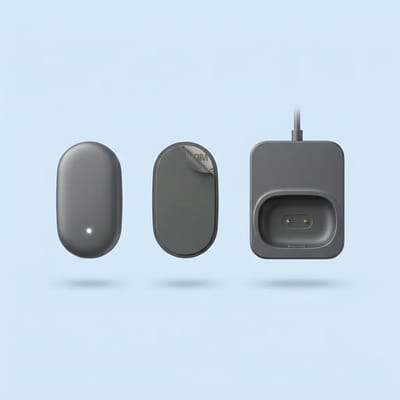
XNEEX PosturePro™ is a smart posture trainer with a vibration sensor. It's small and fits under your shirt, has several sensitivity levels, is rechargeable and lasts for days, and comes with a compact charging dock.
In the box: the sensor, a charging dock, replacement adhesive pads, a charging cable and a user guide.
And for the end of a long day of sitting, XNEEX BackWave™ is a back massage cushion with rotating shiatsu massage, heat and vibration that you place on your chair or bed for a relaxing moment of about 15–20 minutes. It's also worth checking out our tight back guide and our Back collection.
Questions about the products? Email us at hello@getxneex.com, and you have 30 days to return, no questions asked.
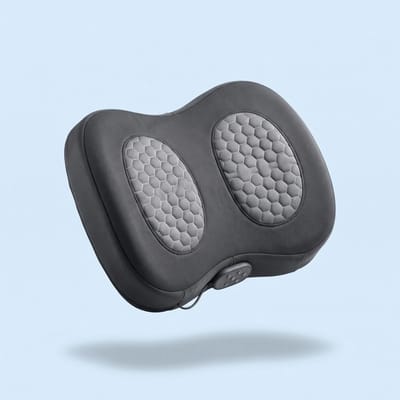
XNEEX BackWave™ – Back Massage Cushion with Heat and Vibration
Show me the massage cushionFrequently asked questions
Does a posture trainer really help you sit upright?
A posture trainer doesn't hold you up; it reminds you. Each vibration brings your attention back to your posture at a moment when it's easy to forget, and your own muscles do the work. When you use it gradually alongside a well-set-up workspace and breaks, the reminders help you build an upright sitting habit.
How long should I use a posture trainer each day?
Start with about 30 minutes a day on the most forgiving sensitivity. As your body adjusts, gradually extend the time and then raise the sensitivity. There's no need to wear it all day from day one, and either way it's important to take breaks to get up and move.
Which is better, a posture brace or a posture trainer?
It depends on what you're looking for. A brace holds your shoulders in place passively. A posture trainer vibrates when you slouch, so your own muscles do the work and a habit forms. If you have a diagnosed orthopedic problem, it's a good idea to check with a doctor or physical therapist before choosing.
Can you see the posture trainer under clothes?
PosturePro™ is a small, discreet sensor that attaches to your upper back and fits under your shirt. The vibration is gentle and only you can feel it, so you can use it at the office, in meetings or at home without anyone noticing. Replacement adhesive pads are included in the box.
How do I know my workspace is set up correctly?
A quick check: the top of your screen is roughly at eye level, your feet are flat on the floor, your back rests against the backrest, and your elbows are close to your body. If you find yourself leaning forward to see or type, move the screen or keyboard closer.
More from the Knowledge Center
Long hours of sitting and your back: quick moves at your deskTight back and tired muscles: a guide to what helpsHow to use a massage gun correctly: how long, what speed and where not toAll articles →This article is general information and is not a substitute for medical advice.