Working From Home and Back Pain: How to Set Up a Comfortable Workspace Without an Office

The short answerWhen working from home comes with back pain, you usually don't need new furniture – just a better setup of what you already have. Adjust your seat height so your elbows are level with the table and your feet are planted firmly, raise your screen to eye level, add a separate keyboard for your laptop plus some back support, and get up for a few minutes every hour. That way, even the kitchen table can become a more comfortable place to work.
In brief
- Start with the chair: elbows level with the table, feet stable on the floor or on a footrest.
- The top of the screen at roughly eye level, about an arm's length away.
- Laptop for long hours: raise it and connect a separate keyboard and mouse.
- Get up, move and change position at least once an hour – even when nobody's watching.
Why does working from home sometimes come with back pain?
At home, most people work on surfaces that weren't designed for work: a high kitchen table, a hard dining chair, the couch or even the bed. When working from home goes on for hours, your body adapts to that setup, and by the end of the day you feel it in your back, neck and shoulders.
On top of that, you move less at home. There's no walk to the meeting room, no commute and no coffee break with colleagues. So the two most important steps are setting up your workspace and building in regular breaks.
How do I adapt a regular chair to a table at home?
The goal is for your elbows to be roughly level with the tabletop, your shoulders relaxed and your feet planted firmly. If your chair doesn't adjust, use what you have at home.
- Table too high: raise your seat with a firm seat cushion, and put a box or a stack of books under your feet as a footrest.
- Chair too deep: add a small cushion or a rolled-up towel at lower-back height, so your back is supported and doesn't slump forward.
- Knees: roughly level with your hips, with your feet not dangling in the air.
- Distance from the table: sit close enough that you don't need to lean forward to type.
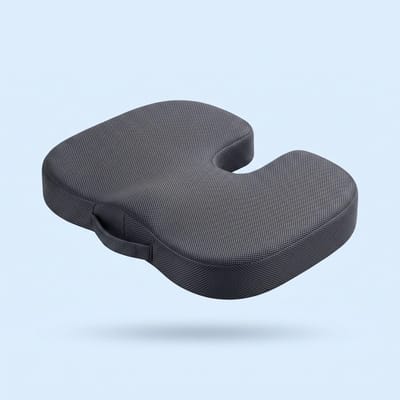
A seat cushion like XNEEX SitRight™ can help when your chair is hard or low. It's made of dense U-shaped memory foam with a rear cutout that takes pressure off the tailbone, and it encourages upright sitting. Place it with the cutout facing back, and sit so your tailbone is over the cutout and your thighs are supported on both sides. Our article How to choose a seat cushion for your chair goes into more detail on choosing one.
How high should my screen be?
The top of the screen should be roughly at eye level, about an arm's length away. That keeps your head over your shoulders instead of pulled forward and down.
If your screen is low, raise it on a stand, a shoebox or a few books. If you wear reading glasses, you may need the screen slightly lower so you don't tilt your head back.
What if I only work on a laptop?
A laptop on the table forces a choice: either the screen is too low, or the keyboard is too high. For work that lasts more than an hour or two, the simple fix is to raise the laptop and connect a separate keyboard and mouse.
- Put the laptop on a stand or a stack of books until the top of the screen is at eye level.
- Connect a keyboard and mouse, and place them close to the edge of the table.
- Check that your elbows are close to your body and your wrists are straight while typing.
Working on the couch or in bed is fine for a few minutes, but not for a whole day. If you have no choice, put a cushion behind your lower back and a stable tray on your knees.
Which spot at home works best for working?
There's no perfect spot, but each one has a small fix that makes a difference. The table sums up the common situations:
| Where you work | What's usually uncomfortable | What you can change |
|---|---|---|
| Kitchen table | The table is high, the chair is hard | A seat cushion for height, a footrest |
| Small desk | No room for a screen and keyboard | A monitor stand, a compact keyboard |
| Couch | Your back sinks, your head tilts down | A lower-back cushion, only for short stretches of time |
| Bed | No back support, screen on your knees | Avoid it for long work sessions |
How do I build breaks into a workday at home?
The simplest approach: get up at least once an hour, even if only for two minutes. Even the best setup doesn't replace movement.
- Set a reminder on your phone or computer.
- Take phone calls standing up or walking around the house.
- Fill a small glass of water, so you have to get up again.
- Change where you work now and then – for example, an hour standing at a high counter.
For quick moves you can do at your desk, read our article Sitting for long hours and your back.
How do I remember to sit up straight when nobody's around?
At home it's easy to slump into a position without noticing. A gentle reminder can help you build the habit.
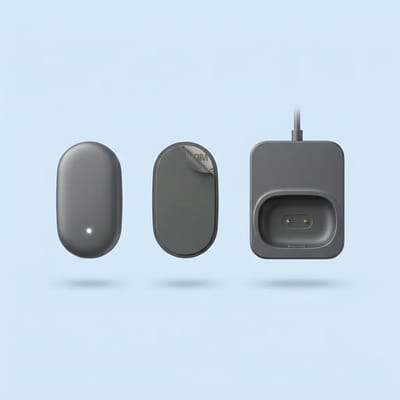
XNEEX PosturePro™ is a small sensor that attaches to your upper back. You calibrate it with one press while sitting upright, and from then on it vibrates gently when you slouch. You can adjust the sensitivity, start with half an hour a day and build up gradually. It's not suitable for people with a pacemaker or adhesive sensitivity.
You'll find more sitting and back accessories in the Back collection. If you're not sure what suits your space, email us at hello@getxneex.com – and you have 30 days to return.
Frequently asked questions
How should I sit at the kitchen table?
Raise your seat until your elbows are level with the table, for example with a firm seat cushion. If your feet don't reach the floor, put a box or some books under them. Lean back against the chair, and if the backrest is too far away, add a small cushion behind your lower back.
Can I work from home with just a laptop?
For short sessions, yes. For a full workday, it's better to raise the laptop so the top of the screen is at eye level, and connect a separate keyboard and mouse. That way you don't have to tilt your head down to see the screen or hunch your shoulders to type.
How often should I get up from my chair when working from home?
A simple general recommendation is to get up at least once an hour, even for a minute or two. You can set a reminder, take calls standing up or walk to the kitchen to refill your water. Changing position regularly matters just as much as the chair itself.
Is working from the couch bad for my back?
Working from the couch for a few minutes is fine, but over hours your back tends to sink and your head tilts down over the screen. If you have no choice, put a cushion behind your lower back and a stable tray on your knees, and get up more often.
Does a seat cushion work on a regular dining chair?
Yes, a seat cushion can raise a low chair and soften a hard one. With SitRight, place the cushion with the rear cutout facing back, so your tailbone is over the cutout and your thighs are supported on both sides. The cover is removable and washable.
More from the Knowledge Center
Sitting for long hours and your back: quick moves you can do at your deskSeat cushions: how to choose one for your back and tailbone, at the office and in the carAll articles →This article is general information and is not a substitute for medical advice.